

IoTSentinel
Open-source Raspberry Pi security project
Solo open-source project // Raspberry Pi home network security
Autonomous Network Security for Every Home.
IoTSentinel explores a local-first alternative to closed home-network tools, with plain-English AI explanations, guided investigation, and Raspberry Pi deployment that stays inspectable rather than black-boxed.
Project status
This is a serious build in progress, not a polished commercial appliance
The site is intentionally honest about scope: what exists now, what is credible already, and what still needs hardening.
What this is
A solo open-source project exploring how much useful home-network security can fit onto a Raspberry Pi without turning the system into a black box.
Who it is for
Curious homeowners, makers, students, and technical evaluators who want to understand their network instead of outsourcing all visibility to a closed vendor.
What works today
Passive monitoring, device discovery, CVE-on-join checks, AI alert rewrites, dashboard access, and guided setup for the current public image.
What is still maturing
Gateway-mode hardening, broader hardware validation, documentation depth, and the support/operational polish you would expect from a commercial appliance.
What you can test today
A project visitors can evaluate, not just read about
The site should make it obvious what is already real in the public image, so expectations stay grounded and technical trust stays high.
See it in action
Watch the current build
A short walkthrough of the current public build, from sign-in to monitoring views.
What the video is showing
00:00
Sign in and orient yourself
The demo opens on the current auth flow, then moves into the dashboard so new visitors can see the project from first login through active monitoring.
00:03
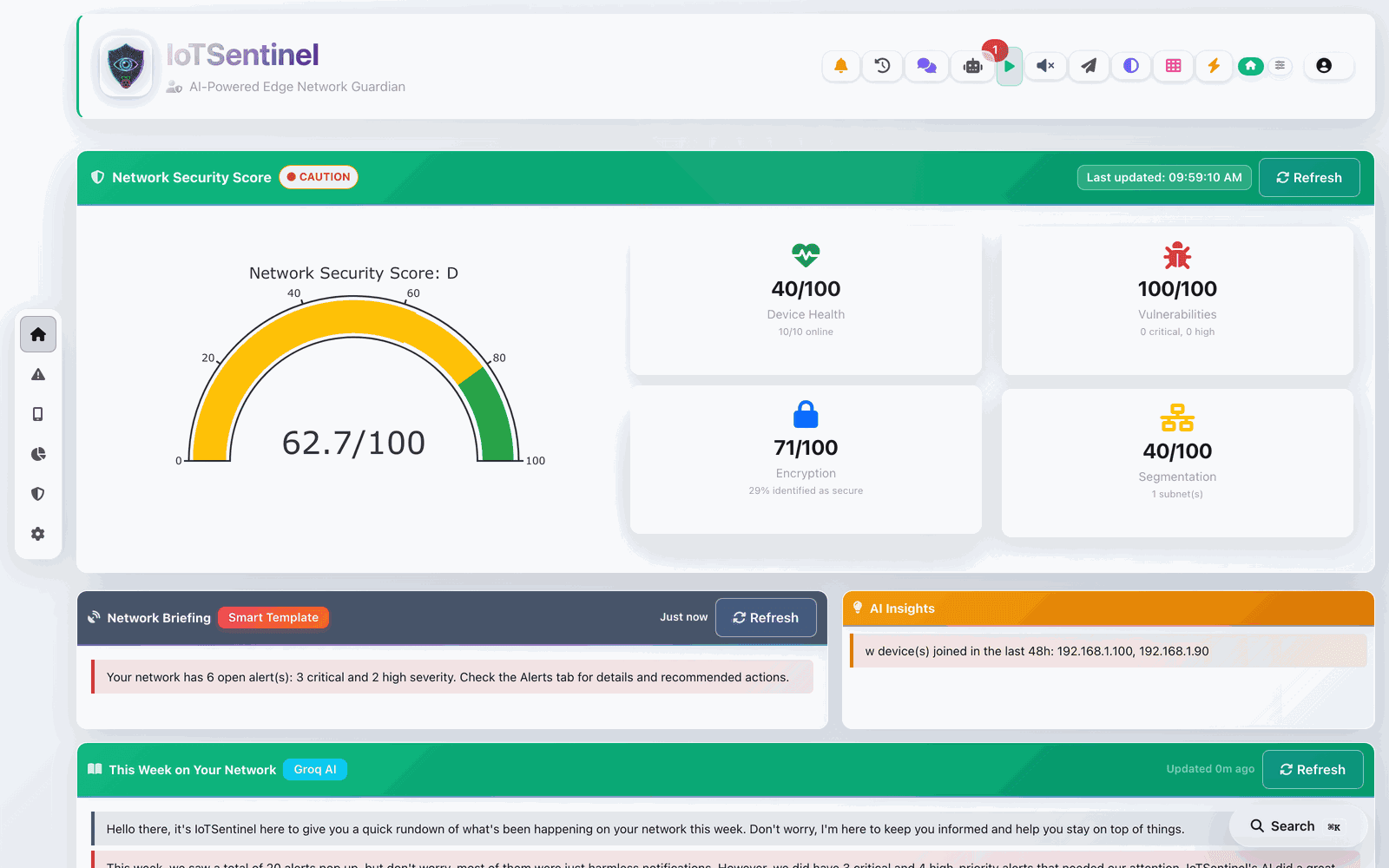
Inspect devices and score
You can see the network inventory, security posture, and the device-level view that turns a busy LAN into something understandable.
00:06
See plain-English alerts
The AI layer rewrites technical detections into straightforward language and anchors the explanation to the device and event context.
00:09
Follow the project direction
The rest of the flow hints at where the project is going next: deeper investigation, gateway inspection, and more autonomous response paths.
Read the deeper breakdowns
How it works
End-to-end flow from discovery and traffic collection into scoring, storage, and the dashboard.
AI features
Plain-English alerts, provider fallback, privacy mode, and where AI is actually useful here.
Gateway mode
Honest status for the deeper IDS/IPS path, including what is working and what is still being hardened.
AI in practice
A real example of what the explanation layer adds
The project becomes easier to trust when the site shows exactly how raw detections are translated into something a normal operator can understand.
Raw detection
Plain-English explanation
Start here
Choose the path that matches why you arrived
The site needs to explain the idea, support evaluation, and still give technical visitors enough depth to take the project seriously.
Metrics and graphs
Numbers that make the project easier to size up
These visuals are not vanity charts. They are here to make the project’s scope, hardware cost, and engineering emphasis easier to assess at a glance.
Cost context
Entry-cost comparison
IoTSentinel
Pi hardware
$75
Firewalla
Entry hardware price
$179
Fing
Annual subscription
$99
Pi-hole
Software only
$0
At a glance
Automated tests
Test files
AI fallback stack
Security scan layers
On-device processing
Hardware cost
Build profile
Project scope bars
Reading the graphs
What these visuals are meant to say
The problem
Most home networks are invisible to the people who own them.
Smart TVs, thermostats, cameras, and plugs talk to external servers constantly. There is no way to know when something goes wrong until a breach has already happened. The kind of intrusion detection that catches this used to need an enterprise appliance and a security team.
Invisible by default
The average home has dozens of connected devices and no single place to see what they are doing.
Silent until it is too late
Compromised cameras and plugs are quietly recruited into botnets, exfiltrating data with no warning.
Enterprise tools, enterprise prices
Real intrusion detection has historically been locked behind expensive appliances and expert operators.
What it does
One appliance, three layers of defence
From plug-and-play visibility to autonomous response, IoTSentinel scales with how much protection you want.
v1.0.0 // Passive-first
See every device the moment it joins
Plug-and-play monitoring with no extra hardware. IoTSentinel discovers and fingerprints every device on your network and scores your overall security posture in real time.
- Discovery via ARP, nmap, mDNS and UPnP
- CVE scanning on device join, matched against the NVD database with CVSS scores
- DNS-level threat intelligence and instant new-device alerts
- A frosted-glass dashboard, dark mode, mobile, installable as a PWA
Flagship // On-device AI
Threats explained in plain English
A background worker rewrites every alert into language anyone can understand. A per-alert AI analyst answers why it happened, grounded in the specific device and its learned baseline.
- Proactive plain-English rewrites of every alert
- An Ask Why analyst grounded in your actual network data
- Auto-narrated weekly security story and per-device profiles
- Natural-language questions answered with validated read-only SQL
Advanced // Gateway IDS/IPS
Autonomous detection and response
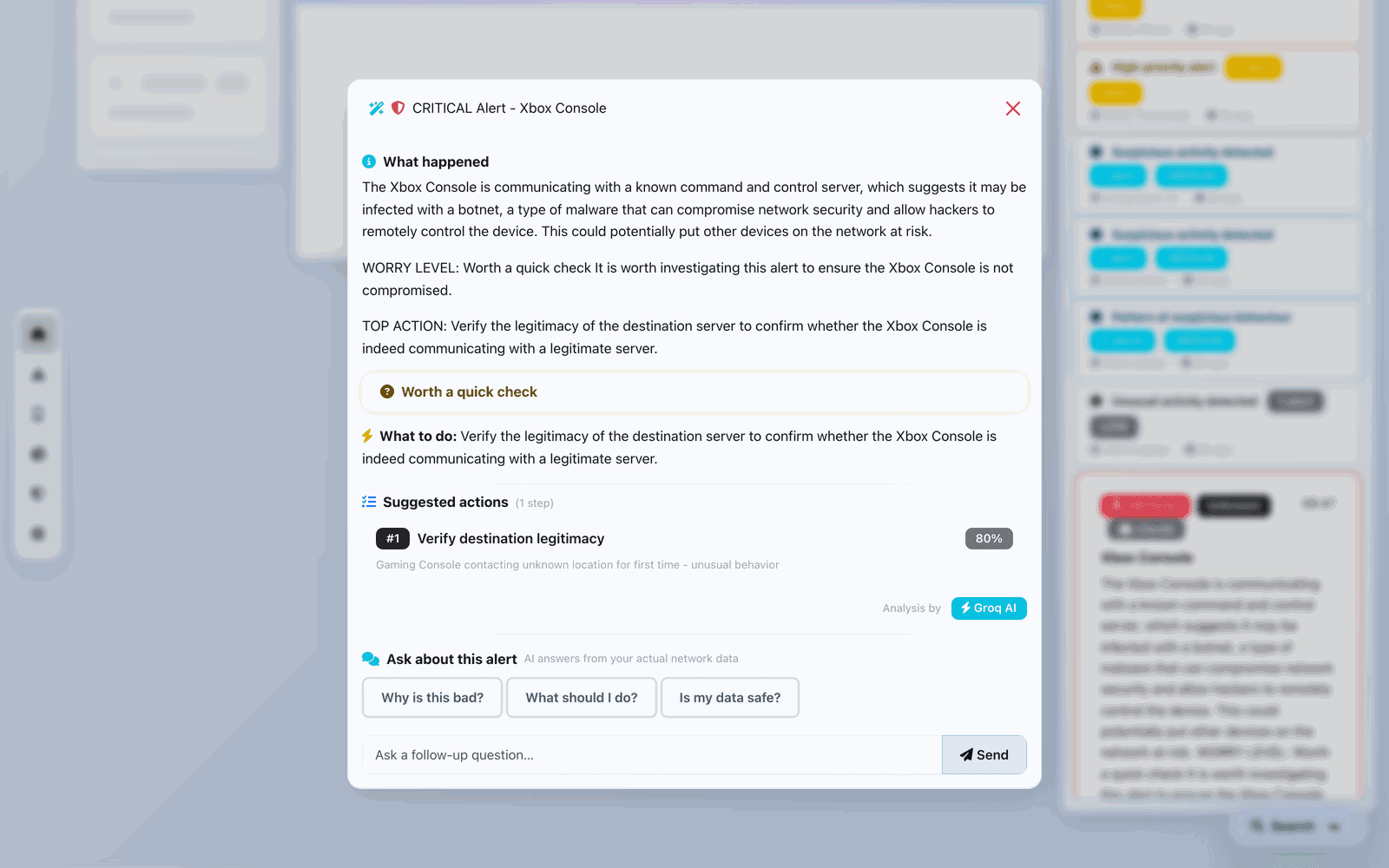
In optional Gateway mode, device traffic passes through the Pi for full inspection. Built and selectable today, hardened into a first-class path in v1.1.
- Real-time unsupervised ML anomaly detection with the River library
- An autonomous agent with a transparent 5-step investigation
- Attack paths mapped to the MITRE ATT&CK kill chain
- Inline firewall blocking with self-lockout guard and circuit breaker
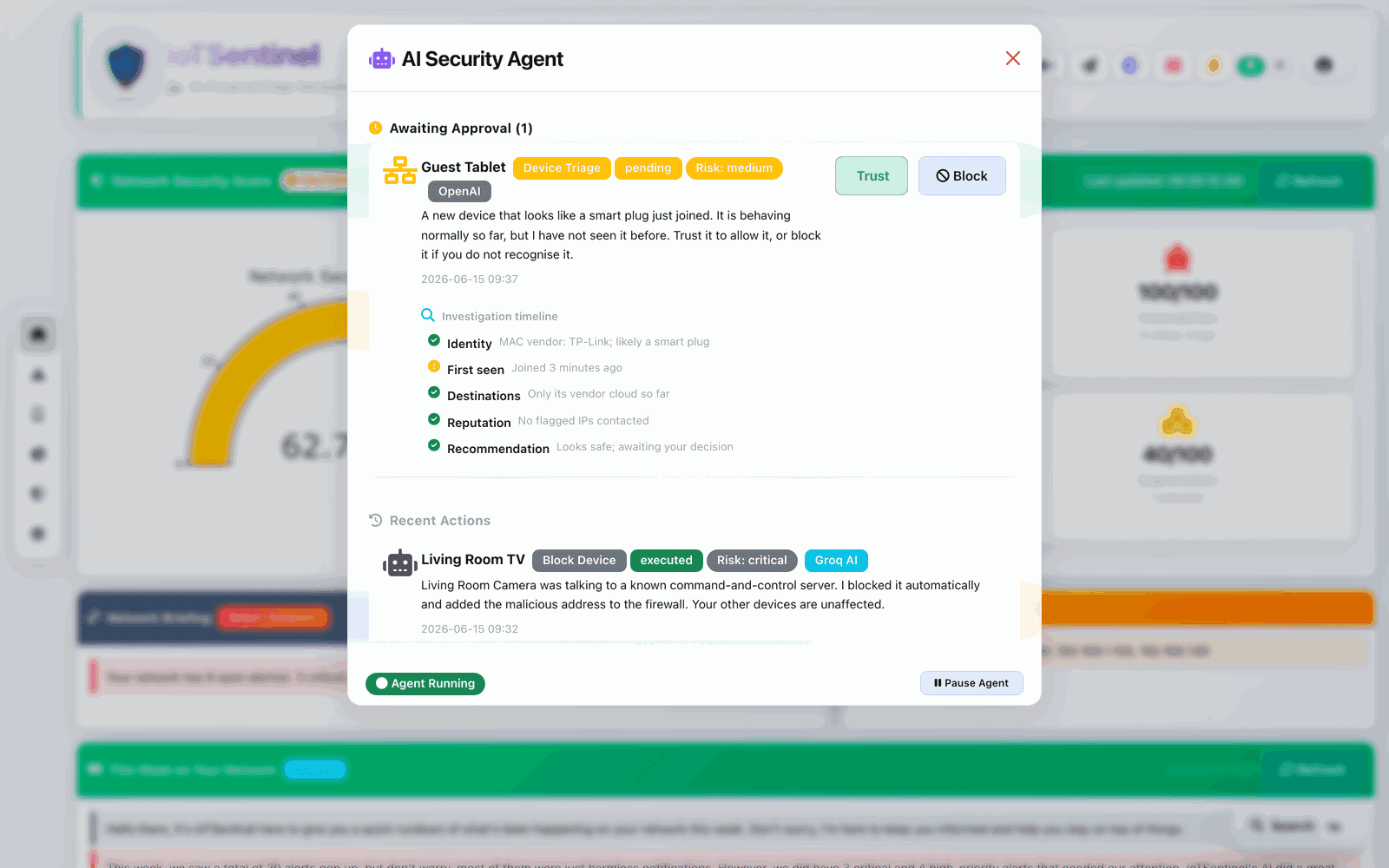
Global destination map
Every external destination your devices reach, geolocated over the last 24 hours.
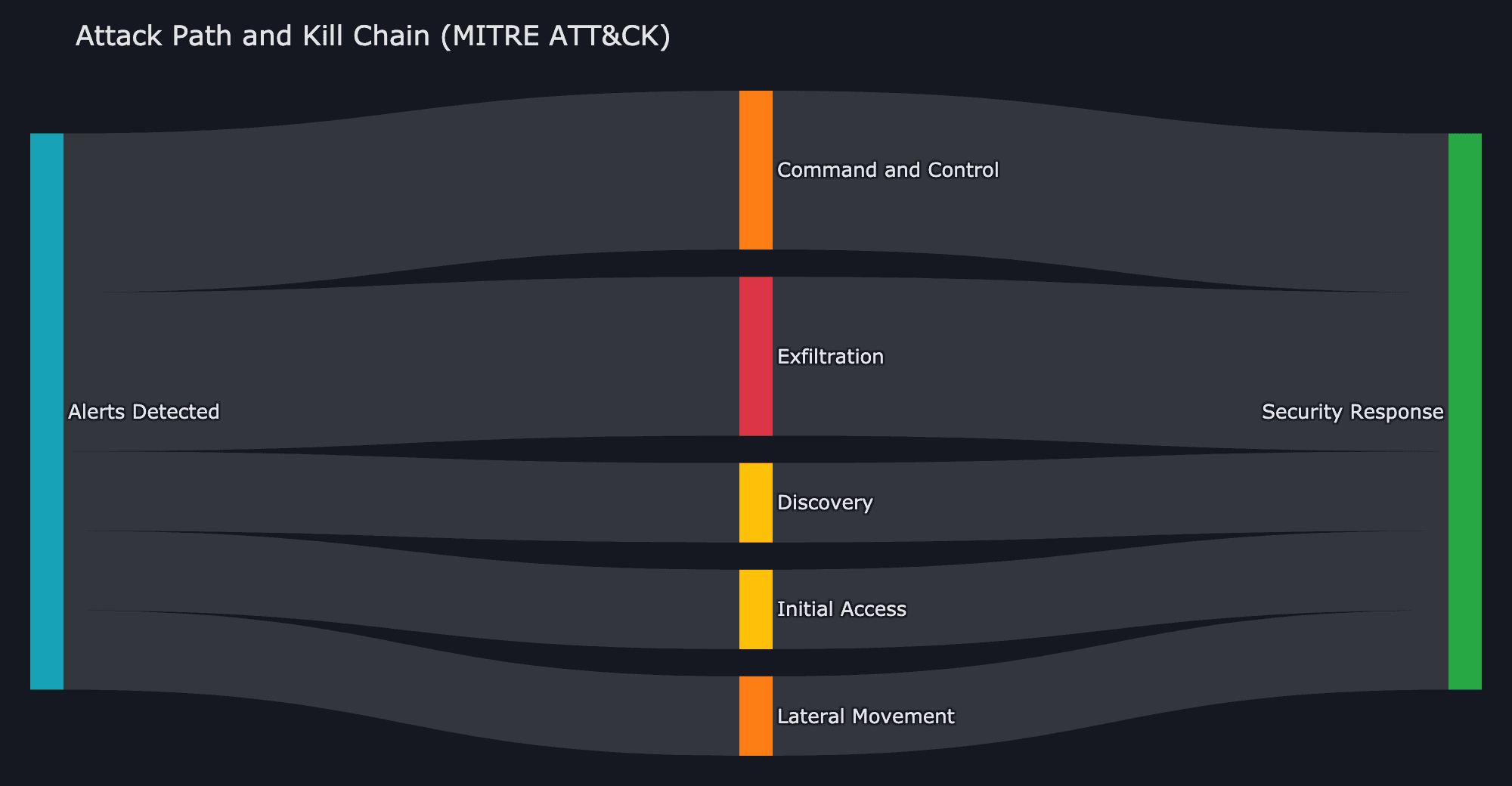
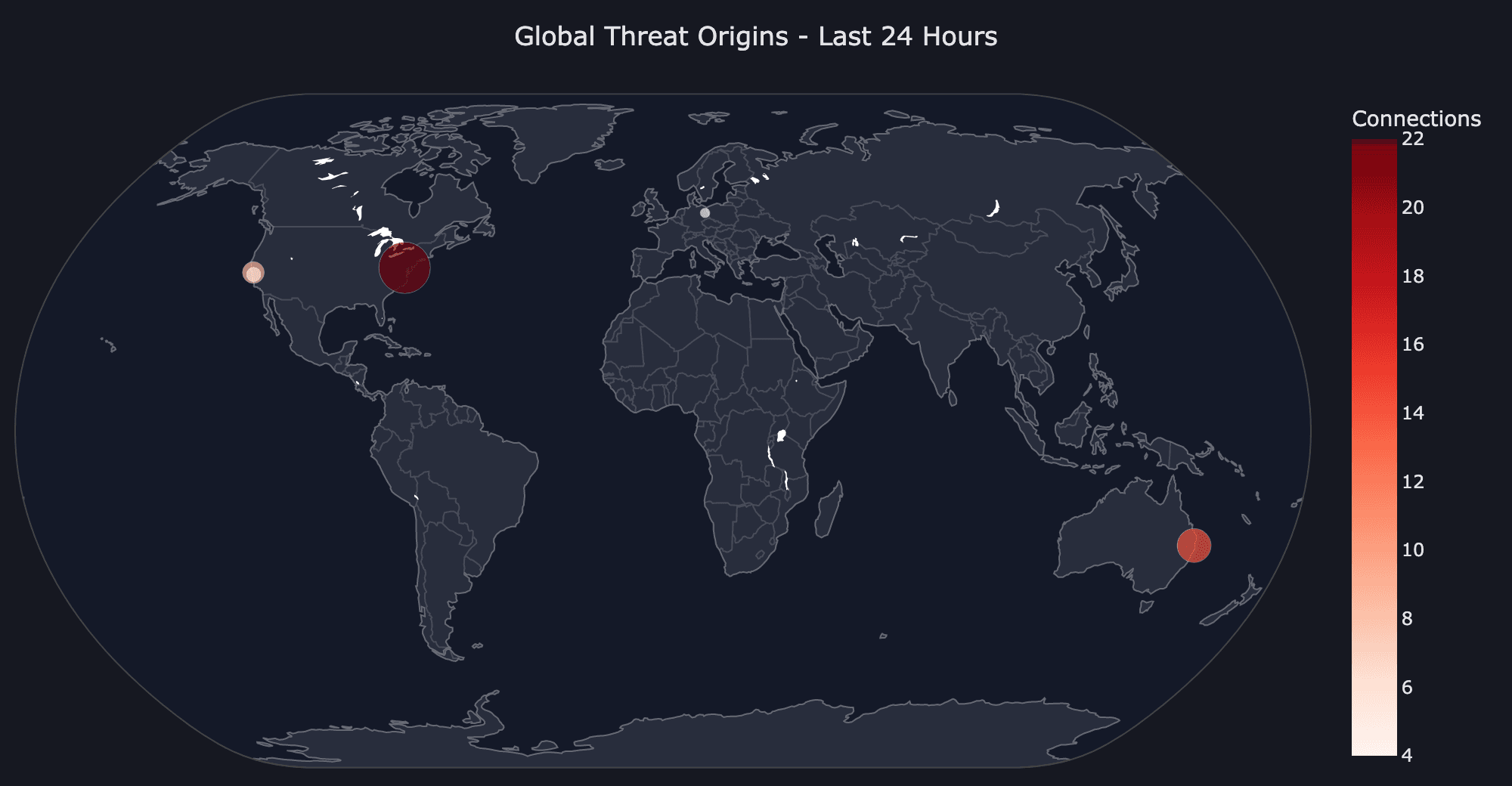
Attack-path kill chain
Related events chained and mapped to MITRE ATT&CK stages.
In everyday use
What it looks like on a real home network
IoTSentinel is not a dashboard you check once and forget. Here is how it earns its place day to day.
Catch a compromised camera
A smart camera starts beaconing to an unknown server. IoTSentinel flags it, checks the destination reputation, and tells you in plain English what to do.
Vet every new gadget
The moment a new plug or bulb joins, it is fingerprinted and scanned for known CVEs so you can trust or block it before it does anything.
Read your week at a glance
A narrated weekly story summarises what every device did, what was blocked, and what needs your attention, delivered to your phone.
Ask questions in plain English
Type a question like which devices talked to the internet last night and get an answer built from a validated read-only query on your own data.
Check in from anywhere
Enable remote access and reach the dashboard over a permanent HTTPS link while you travel, with no port forwarding or VPN to configure.
Keep the whole home covered
Role-based access lets you share a read-only view with the household while you keep admin control, all from one appliance.
On-device intelligence
A 6-tier AI engine that never goes dark
Every alert gets a plain-English explanation, online or completely offline. If one provider fails, the next takes over automatically, all the way down to rule-based templates that need no network at all.
- 1OpenAIgpt-4o-miniCloud
- 2Anthropic Claudeclaude-haiku-4-5Cloud
- 3Groqllama-3.1-8b-instantCloud
- 4Google Geminigemini-2.5-flashCloud
- 5Ollamagemma2:2bLocal
- 6Smart templatesrule-basedOffline
System design
How the whole system fits together
A local-first pipeline: collect signals from the network, analyze them on-device, then deliver understandable alerts and dashboards back to the operator.
Setup
Flashed and protecting in minutes
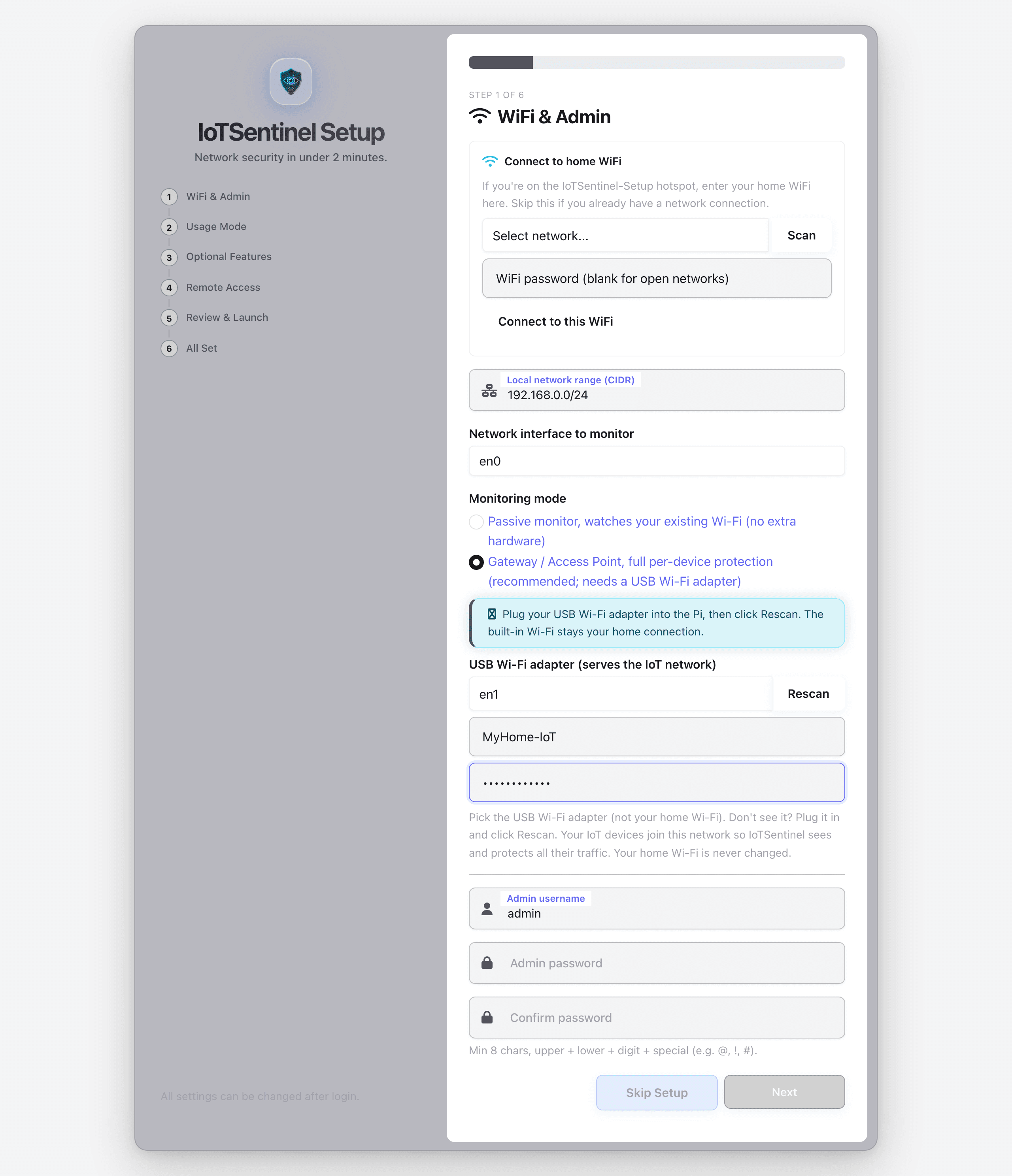
No terminal, no config files, no networking knowledge required. Everything happens in a browser wizard.
Flash the image
Download the .img.xz and write it to an SD card with Raspberry Pi Imager. No terminal, no config files.
Connect to the setup hotspot
On first boot the Pi opens an IoTSentinel-Setup Wi-Fi hotspot. Join it from your phone or laptop.
Run the browser wizard
A browser opens the setup wizard. Enter your Wi-Fi, create an admin account, and set a strong password.
Choose your monitoring mode
Pick Passive for plug-and-play visibility, or Gateway for full IDS/IPS. Toggle optional AI, email and threat-intel features.
You are protected
The Pi reboots onto your network and the dashboard comes up. Install it as an app and enable remote access if you want it.
Known limitations
Honest boundaries that make the project easier to trust
A technical audience expects clarity on what is still rough. This section exists to set those expectations explicitly instead of hiding them.
Gateway mode is still being hardened
In progressThe deeper IDS/IPS path exists, but it still needs broader testing, clearer safety rails, and stronger install guidance before it should be treated as the default path.
This is not a managed appliance
By designThere is no commercial support desk, hosted control plane, or remote operations layer behind the project.
Hardware validation is still expanding
In progressThe public image is credible on current target hardware, but compatibility breadth still trails commercial competitors.
Documentation depth is improving
OngoingCore setup and architecture paths are covered, but contributor and edge-case docs still need more breadth.
Deployment footprint
What the current evaluation path actually needs
Engineering quality
Evidence from the build so far
These numbers are here to show seriousness and scope, not to pretend the project is already finished.
Automated tests
Test files
AI fallback stack
Security scan layers
On-device processing
Hardware cost
Continuous integration on every change
- Headless-Chrome render gate (Selenium)
- Live app-boot smoke test
- Python 3.11 and 3.12 CI matrix
- Emulated ARM64 dependency check
- Gated Raspberry Pi image build
- Bandit, pip-audit, Dependabot, detect-secrets
Where it fits
An open-source alternative in progress
IoTSentinel is aimed at people who want more transparency, local-first behavior, and extra AI-assisted explanation than most closed consumer tools provide.
Comparison group
Visibility and ownership
What you can actually inspect and keep under your control.
| Capability | IoTSentinel | Firewalla | Fing | Pi-hole |
|---|---|---|---|---|
| Price | ~$75 | $179-$349 | $99/yr | Free |
| 100% on-device / private | Partial | |||
| Open source | ||||
| Runs on your own Pi |
Comparison group
Detection and explanation
Where IoTSentinel tries to add technical depth plus readable output.
| Capability | IoTSentinel | Firewalla | Fing | Pi-hole |
|---|---|---|---|---|
| CVE scan on device join | ||||
| Plain-English AI alerts | ||||
| On-device ML anomaly detection | Cloud | |||
| Choose your AI provider |
Comparison group
Response and deployment
What happens once something suspicious is found.
| Capability | IoTSentinel | Firewalla | Fing | Pi-hole |
|---|---|---|---|---|
| Blocks threats (IDS/IPS) | Gateway | DNS only | ||
| Remote dashboard access | Manual | |||
| Browser-first setup flow | ||||
| Managed support surface |
Directional comparison only. Prices and competitor capabilities change over time. Firewalla, Fing, and Pi-hole remain the source of truth for their own products.
Where it is going
A clear path from solo project to stronger open-source appliance
The current public image is passive-first today. More advanced gateway behavior exists, but the next job is hardening and documenting it honestly.
Passive-first public release
Discovery, CVE-on-join scanning, the full on-device AI layer, multi-channel notifications, remote access and PWA install. Validated on real hardware.
Gateway hardened
Turn Gateway mode into a better-tested, better-documented path. Lights up the River ML anomaly detection, autonomous IDS/IPS blocking and MITRE kill-chain dashboards with clearer installation and safety guidance.
Appliance and whole-network
A pre-built, pre-flashed unit and whole-network gateway mode so full protection reaches every device with no re-pairing.
Correlated intelligence
Incident stories that narrate an attack chain, one-tap AI action plans, and predictive deviation alerts that learn each device's daily rhythm.
Questions
Frequently asked
Why this exists
Why this project exists
IoTSentinel exists because home-network security tools are either too opaque, too limited, or too commercial to inspect properly. The goal here is not to pretend a solo open-source build has already matched appliance vendors on polish. The goal is to prove that a transparent, local-first alternative with useful AI explanation can be real, testable, and worth contributing to.
Open source // Solo-built
Follow the project, try the image, or inspect the code.
IoTSentinel is a solo open-source attempt to make home network security more understandable, more local-first, and more transparent, while using AI only where it genuinely helps.